# Additional API requests
# GET Retrieve duplicate check results (similar applicants)
This request allows you to get a list of profiles with data similar to an applicant. All response fields can be empty (null).
GET /resources/checks/latest?type=SIMILAR_SEARCH&applicantId={applicantId}
Query parameters
| Name | Type | Required | Description |
|---|---|---|---|
applicantId | String | Yes | Unique identifier of the applicant in our system. |
type | String | Yes | The value SIMILAR_SEARCH. |
Response
The response is a list of duplicate check results containing information about the found similar applicants.
| Name | Type | Description |
|---|---|---|
answer | String | Duplicate check result (GREEN/RED/YELLOW). |
createdAt | Date | Date and time of the last check in GMT (YYYY-MM-dd hh:mm:ss.fff). |
similarSearchInfo | Object | Information about the performed similar applicant search. |
Fields of the similarSearchInfo object
| Name | Type | Description |
|---|---|---|
answer | String | Duplicate check result (GREEN/RED/YELLOW). |
duplicateApplicantHits | List of Objects | List of data about a specific match. |
Fields of the duplicateApplicantHits object
| Name | Type | Description |
|---|---|---|
applicantId | String | Unique identifier of the applicant in our system. |
matchedFields | List of Strings | List of matching JSON fields containing applicant information. |
types | List of Strings | Match type (Data - text, Face - image). |
Example
curl  -X  GET  \
	'https://api.idngo.kz/resources/checks/latest?type=SIMILAR_SEARCH&applicantId=5eea3f5204f940217bcbc03d'
{
	"checks": [
		{
			"answer": "RED",
			"createdAt": "2023-01-17 13:17:38",
			"similarSearchInfo": {
				"answer": "RED",
				"duplicateApplicantHits": [
					{
						"applicantId": "61badd2937955c000144613d",
						"matchedFields": [
							"info.lastName",
							"info.firstName",
							"info.idDocs.ID_CARD",
							"info.dob"
						],
						"types": [
							"text",
							"image"
						]
					}
				]
			}
		}
	]
}
# GET Retrieve TIN check result
This request allows you to obtain data extracted from external sources using the user's TIN.
GET /resources/checks/latest?type=TIN&applicantId={applicantId}
Query parameters
| Name | Type | Required | Description |
|---|---|---|---|
applicantId | String | Yes | Unique identifier of the applicant in our system. |
type | String | Yes | The value TIN. |
Response
The response is a single list of checks called checks.
| Name | Type | Description |
|---|---|---|
answer | String | User TIN check result (GREEN/RED/YELLOW). |
createdAt | Date | Date and time of the last TIN check result (GMT). |
extractedDoc | Object | External verification of source data. |
Fields of the extractedDoc object
| Name | Type | Description |
|---|---|---|
addresses | List of Objects | List of addresses extracted from external TIN verification sources. |
Fields of the addresses object
| Name | Type | Description |
|---|---|---|
country | String | Three-letter country code Alpha-3 (for example, RUS). |
postCode | String | Postal code. |
town | String | City or locality name. |
street | String | Street name or full address, depending on the document format. |
buildingNumber | String | Building number. |
subStreet | String | Additional street information. |
state | String | Region name (province/state/republic, etc.). |
startDate | Date | Start date of residence at the address. |
endDate | Date | Date when the address was changed. |
Example
curl  -X  GET  \
	'https://api.idngo.kz/resources/checks/latest?type=TIN&applicantId=5eea3f5204f940217bcbc03d'
{
	"checks": [
		{
			"answer": "GREEN",
			"createdAt": "2023-04-17 12:47:21",
			"extractedDoc": [{
				"street": "1157 BOLENS CREEC RD",
				"state": "NC",
				"buildingNumber": "1157",
				"town": "BURNSVILLE",
				"postCode": "28714-7602",
				"startDate": "1996-03-01 00:00:00",
				"endDate": "2016-10-07 00:00:00",
				"country": "USA",
			}]
		}
	]
}
# POST Generate external WebSDK link
POST /resources/sdkIntegrations/levels/{levelName}/websdkLink?externalUserId={externalUserId}
Request parameters
| Name | Type | Required | Description |
|---|---|---|---|
levelName | String | Yes | The name of the verification level, as configured in the «Application Levels» section of the Dashboard. |
Query parameters
| Name | Type | Required | Description |
|---|---|---|---|
externalUserId | String | No | External applicant identifier — the unique identifier of the user in your system. Required if you need to create a link for an applicant. |
externalActionId | String | No | External action identifier. Required only to create a link for an applicant action. |
locale | String | No | WebSDK language in ISO 639-1 format. |
ttlInSecs | Integer | No | Connection lifetime in seconds (default — 1800). |
Response
| Name | Type | Description |
|---|---|---|
url | String | Link to complete verification. |
Example
curl  -X  POST  \
	'https://api.idngo.kz/resources/sdkIntegrations/levels/basic-kyc-level/websdkLink?externalUserId=304775ty'
{
	"url": "https://api.idngo.kz/idensic/l/#/lPDnIKwzmxPfDohk"
}
# POST Send verification status email to user
The method below sends an email with the current verification status to the email address specified in the applicant.
POST /resources/applicants/{applicantId}/verificationStatusEmail
Request parameters
| Name | Type | Required | Description |
|---|---|---|---|
applicantId | String | Yes | Unique identifier of the applicant in our system. |
Example
curl  -X  POST  \
	'https://api.idngo.kz/resources/applicants/60b8ce73460647000145384e/verificationStatusEmail'
{
	"ok": 1
}
# GET Retrieve applicant activity log
This request allows you to track the activity of an applicant.
GET /resources/applicantTimeline/{applicantId}
Request parameters
| Name | Type | Required | Description |
|---|---|---|---|
applicantId | String | Yes | Unique identifier of the applicant in our system. |
Response
| Name | Type | Description |
|---|---|---|
applicantId | String | Unique identifier of the applicant in our system. |
items | Array of objects | Activity event data. |
Fields of the items object
| Name | Type | Description |
|---|---|---|
ts | String | Event timestamp. |
activity | String | Type of event that affected the profile status. |
ipInfo | Object | IP address and location. |
trackingData | Object | IP address and source of activity (WebSDK, MobileSDK, Dashboard). |
Example
curl  -X  GET  \
	'https://api.idngo.kz/resources/applicantTimeline/60b8ce73460647000145384e'
{
	"applicantId" : "60b8ce73460647000145384e",
	"items" : [ {
		"id" : "60cb2bb54152840001b09b8a",
		"ts" : "2021-06-17 11:02:13",
		"activity" : "moderator:completed:review",
		"subjectName" : "Backoffice",
		"country" : "SWE",
		"reviewAnswer" : "GREEN",
		"elapsedSincePendingMs" : 148469
	},
	{
		"id" : "60cb2b207bbfc20001ff8336",
		"ts" : "2021-06-17 10:59:44",
		"trackingData" : {
			"ip" : "217.211.151.118",
			"xClientId" : "WebSDK"
		},
		"ipInfo" : {
			"ip" : "217.211.151.118",
			"countryCode2" : "SE",
			"countryCode3" : "SWE",
			"city" : "Bromma",
			"zipCode" : "168 54",
			"lat" : 59.35,
			"lon" : 17.9167,
			"asn" : 3301,
			"asnOrg" : "Telia Company AB",
			"riskyAsn" : false
		},
		"userAgentInfo" : {
			"uaPlatform" : "Android",
			"uaBrowser" : "Chrome",
			"uaDeviceType" : "Mobile Phone",
			"uaBrowserVersion" : "0.0"
		},
		"activity" : "applicant:changed:status",
		"subjectName" : "UserId",
		"country" : "SWE",
		"status" : "pending"
	},
	{
		"id" : "60cb2b1d4152840001b0883f",
		"ts" : "2021-06-17 10:59:41",
		"trackingData" : {
			"ip" : "217.211.151.118",
			"xClientId" : "WebSDK"
		},
		"ipInfo" : {
			"ip" : "217.211.151.118",
			"countryCode2" : "SE",
			"countryCode3" : "SWE",
			"city" : "Bromma",
			"zipCode" : "168 54",
			"lat" : 59.35,
			"lon" : 17.9167,
			"asn" : 3301,
			"asnOrg" : "Telia Company AB",
			"riskyAsn" : false
		},
		"userAgentInfo" : {
			"uaPlatform" : "Android",
			"uaBrowser" : "Chrome",
			"uaDeviceType" : "Mobile Phone",
			"uaBrowserVersion" : "0.0"
		},
		"activity" : "user:added:idDoc",
		"subjectName" : "UserId",
		"country" : "SWE",
		"imageId" : "665222684",
		"idDocType" : "SELFIE"
	},
	{
		"id" : "60cb2af46623af0001798a4c",
		"ts" : "2021-06-17 10:59:00",
		"trackingData" : {
			"ip" : "217.211.151.118",
			"xClientId" : "WebSDK"
		},
		"ipInfo" : {
			"ip" : "217.211.151.118",
			"countryCode2" : "SE",
			"countryCode3" : "SWE",
			"city" : "Bromma",
			"zipCode" : "168 54",
			"lat" : 59.35,
			"lon" : 17.9167,
			"asn" : 3301,
			"asnOrg" : "Telia Company AB",
			"riskyAsn" : false
		},
		"userAgentInfo" : {
			"uaPlatform" : "Android",
			"uaBrowser" : "Chrome",
			"uaDeviceType" : "Mobile Phone",
			"uaBrowserVersion" : "0.0"
		},
		"activity" : "user:added:idDoc",
		"subjectName" : "UserId",
		"country" : "SWE",
		"imageId" : "750640317",
		"idDocType" : "PASSPORT"
	},
	{
		"id" : "60cb2ada44894a000169bb34",
		"ts" : "2021-06-17 10:58:34",
		"trackingData" : {
			"ip" : "104.248.138.23",
			"xClientId" : "API"
		},
		"ipInfo" : {
			"ip" : "104.248.138.23",
			"countryCode2" : "DE",
			"countryCode3" : "DEU",
			"city" : "Frankfurt am Main",
			"zipCode" : "60313",
			"lat" : 50.1188,
			"lon" : 8.6843,
			"asn" : 14061,
			"asnOrg" : "DIGITALOCEAN-ASN",
			"riskyAsn" : true
		},
		"userAgentInfo" : {
			"uaPlatform" : "Unknown",
			"uaBrowser" : "Guzzle Http Client",
			"uaDeviceType" : "Unknown",
			"uaBrowserVersion" : "0.0"
		},
		"activity" : "user:created:applicant",
		"subjectName" : "APP-Token Api",
		"country" : "SWE"
	} ]
}
# GET Retrieve applicant verification report in PDF
This request allows you to generate and download an applicant verification report in PDF format. Make sure you have received a response from the first request before making a new one.
GET /resources/applicants/{applicantId}/summary/report?report={reportType}&lang={en}
Request parameters
| Name | Type | Required | Description |
|---|---|---|---|
applicantId | String | Yes | Unique identifier of the applicant in our system. |
Query parameters
| Name | Type | Required | Description |
|---|---|---|---|
reportType | Integer | Yes | The report type, which depends on the applicant's type (for individuals - applicantReport, for companies - companyReport). |
lang | String | Yes | Language for the verification report in ISO 639-1 format (default: en). |
Response
The response is a binary PDF file containing the generated report.
Example
curl  -X  GET  \
	'https://api.idngo.kz/resources/applicants/60f6f9ab7bbfc20001eca91d/summary/report?report=applicantReport&lang=en'
# GET Retrieve list of available verification levels
To obtain a complete and structured list of verification levels via API, use the following endpoint.
GET /resources/applicants/-/levels
Response
JSON representation of the verification levels list along with their settings.
| Name | Type | Required | Description |
|---|---|---|---|
items | Array of objects | Yes | Each object corresponds to a specific verification level. |
totalItems | Integer | Yes | Total number of all verification levels. |
Fields of the items object
The table below lists the fields inside each items object, which describe the configuration parameters of the verification levels. The presence of some fields depends on the type and settings of a specific level.
# Translation Options for Terms with Explanations
| Field | Type | Description |
|---|---|---|
id | String | Unique identifier of the level. |
name | String | Level name set during creation (cannot be changed later). |
desc | String | Level description (if added during creation). |
requiredIdDocs | Object | Set of documents and data required for verification (for example, steps IDENTITY, SELFIE and corresponding documents: PASSPORT, ID_CARD, etc.). |
websdkFlowId | String | WebSDK customization identifier (if added to the level). |
msdkFlowId | String | MobileSDK customization identifier (if added to the level). |
createdAt | Date | Level creation date and time (GMT). |
createdBy | String | Account that created the level. Value Service means the level was created by IDnGO support. |
modifiedAt | Date | Date and time of the last modification of the level (GMT). |
customPrivacyNoteText | String | User data processing consent text displayed in WebSDK (if specified). |
watchListCheckSettings | Object | Level settings related to AML checks. |
useCustomWatchListCheckSettings | Boolean | Whether custom AML check settings are used. |
useCustomIdDocSettings | Boolean | Whether custom settings for supported documents are used. |
applicantInsightSettings | Array of booleans | Includes fields: advancedEmailCheckEnabled, advancedPhoneCheckEnabled, advancedIpCheckEnabled, advancedIdentityEnrichmentEnabled. Indicates whether the corresponding checks are enabled. |
type | Enum | Type of the level defined at creation: standalone — standard check; actions — additional actions; module — only Liveness and Face match check. |
actionType | Enum | Available if level type is actions. Possible values: paymentMethod, faceEnrollment. |
applicantType | Enum | Applicant type: individual (natural person), company (legal entity). |
Fields of the requiredIdDocs object
The requiredIdDocs object describes the steps needed for verification as well as the required documents and data.
| Field | Type | Description |
|---|---|---|
docSets | Array of objects | A set of document types and their parameters. |
Fields of the docSets array
| Field | Type | Description |
|---|---|---|
idDocSetType | String | Identifier of the document type, for example, IDENTITY, SELFIE, PROOF_OF_RESIDENCE, etc. |
fields | Array of objects | Describes fields that must be filled in. Each object contains: name (field name), required (whether the field is mandatory). |
types | Array of strings | Types of documents required for the specific idDocSetType. |
videoRequired | String | Method of completing the document upload step: disabled — selfie with document.photoRequired — photo via webcam (static face image).passiveLiveness — liveness check.docapture — camera enabled during document verification for real-time photo capture of documents. |
captureMode | String | Capture mode when using docapture: manualAndAuto — document photo is taken automatically or manually via button.manualOnly — photo taken only manually via button. |
uploaderMode | String | Photo upload mode: always — allows uploading a photo from the gallery instead of using the camera.never — disallows uploading from the gallery.fallback — allows gallery upload only if camera is unavailable. |
paymentMethods | Array of objects | Settings for payment method verification (if present in the level). |
questionnaireDefId | String | Questionnaire identifier (if present in the level). |
Example
curl  -X  GET  \
	'https://api.idngo.kz/resources/applicants/-/levels'
{
	"list" : {
		"items" : [
			{
				"id" : "608febf45814660009e22a14",
				"name" : "basic-kyc-level",
				"requiredIdDocs" : {
					"docSets" : [
						{
							"idDocSetType" : "IDENTITY",
							"types" : [ "ID_CARD", "DRIVERS", "PASSPORT", "RESIDENCE_PERMIT" ],
							"subTypes" : [ "FRONT_SIDE", "BACK_SIDE" ]
						},
						{
							"idDocSetType" : "SELFIE",
							"types" : [ "SELFIE" ],
							"videoRequired" : "passiveLiveness"
						}
					]
				},
				"websdkFlowId" : "608febf45814660009e22a16",
				"msdkFlowId" : "608febf45814660009e22a18",
				"createdAt" : "2021-05-03 12:26:28",
				"createdBy" : "Service",
				"modifiedAt" : "2021-09-08 09:18:53"
			}
		],
	"totalItems" : 1
	}
}
# PATCH Update applicant data
If you want to update an applicant's data, use the PATCH method instead of creating a new applicant. This endpoint modifies fields within the applicant's info object.
PATCH /resources/applicants/{applicantId}/info
Request parameters
The body should contain only the fields you want to update. Missing fields will be ignored. To reset certain fields, include them in the unsetFields query parameter.
| Name | Type | Required | Description |
|---|---|---|---|
applicantId | String | Yes | Unique identifier of the applicant in our system. |
unsetFields | String | No | Comma-separated list of fields to reset. |
Request body
Fields within the info object that need to be updated.
Response
Modifying applicant info data may cause issues if used incorrectly. Please ensure that the endpoint returns the expected results in the Sandbox environment.
Example
curl  -X  PATCH  \
	'https://api.idngo.kz/resources/applicants/5b76df770a975a1404cbcb60/info' \
	-H  'Content-Type: application/json'  \
	-d '{
		"firstName"  :  "Andrew",
		"dob"  :  "1990-05-01"
	}'
{
	"firstName": "Andrew",
	"dob": "1990-05-01",
	"country": "GBR",
	"idDocs": [
		{
			"idDocType": "PASSPORT",
			"country": "GBR",
			"number": ""
		},
		{
			"idDocType": "DRIVERS",
			"country": "GBR"
		}
	]
}
# GET Retrieve face Liveness check result
If you want to get the result of an applicant's face liveness check, use this request.
GET /resources/checks/latest?type=FACE_LIVELINESS&applicantId={applicantId}
Query parameters
| Name | Type | Required | Description |
|---|---|---|---|
applicantId | String | Yes | Unique identifier of the applicant in our system. |
type | String | Yes | Value FACE_LIVELINESS. |
Response
Contains a list of real-time face liveness checks.
| Name | Type | Description |
|---|---|---|
checks | Array of objects | A list of objects containing face liveness check results. |
Fields of checks element
| Name | Type | Description |
|---|---|---|
answer | String | The result of the face liveness check. Possible values: GREEN / RED / ERROR. |
id | String | The face liveness check identifier. |
createdAt | Date | The date and time the applicant was created (GMT). |
checkType | String | The type of check: FACE_LIVELINESS. |
Example
curl  -X  GET  \
	'https://api.idngo.kz/resources/checks/latest?type=FACE_LIVELINESS&applicantId=5b76df770a975a1404cbcb60'
{
	"checks": [
		{
			"answer": "GREEN",
			"checkType": "FACE_LIVELINESS",
			"createdAt": "2023-02-17 10:06:44",
			"id": "800c2988-15ab-4b26-a633-9fef4b16d7b6"
		}
	]
}
# GET Retrieve applicant Liveness
If you need a video snippet of the user's face (liveness) from the check, use this endpoint.
GET /resources/applicants/{applicantId}/info/facemap/video?checkId={checkId}
Request parameters
| Name | Type | Required | Description |
|---|---|---|---|
applicantId | String | Yes | Unique identifier of the applicant in our system. |
Query parameters
| Name | Type | Required | Description |
|---|---|---|---|
checkId | String | Yes | Identifier of the face liveness check. |
Response
Binary content representing the video (in most cases video/mp4 format). The Content-Type response header precisely describes the media type of the response.
If only one frame or fewer were captured during the liveness check, the request will result in an error.
Example
curl  -X  GET  \
	'https://api.idngo.kz/resources/applicants/5b76df770a975a1404cbcb60/info/facemap/video?checkId=800c2988-15ab-4b26-a633-9fef4b16d7b6'
# GET Retrieve similar applicants
Using this request, you can get a list of applicants with similar data or face to the applicant.
GET /resources/applicants/{applicantId}/similar/byTextAndFace
If you want to get a list of similar applicants found only by text information, you can call:
GET /resources/applicants/{applicantId}/similar/byText
Make sure to consider the rate limit for these endpoints:
/similar/byTextAndFace- 7 requests per 10 seconds/similar/byText- 10 requests per 10 seconds
Request parameters
| Name | Type | Required | Description |
|---|---|---|---|
applicantId | String | Yes | Unique identifier of the applicant in our system. |
Response
| Name | Type | Description |
|---|---|---|
applicant | Object | Contains data of the similar applicant. |
matchedFields | Array | Matching applicant data fields (for example, info.lastName). |
exactMatch | Boolean | If the data exactly matches — true. |
blacklisted | Boolean | Whether this applicant is on our blacklist or not. |
types | Array | Type of match (text – text data match, image – face match). |
Example
curl  -X  GET  \
	'https://api.idngo.kz/resources/applicants/5eea3f5204f940217bcbc03d/byTextAndFace'
{
	"similarApplicants": [
		{
		"applicant": {
			"id": "5ee8ff2453d48655913daa60",
			"createdAt": "2020-06-16 17:19:32",
			"key": "VMQFJZRXEVHTQWF",
			"clientId": "coolclientid",
			"inspectionId": "5ee8ff2453d48655913daa61",
			"externalUserId": "032ebe8b-957d-48b5-8faf-5156bfc8924e",
			"info": {
				"firstName": "JOHN",
				"firstNameEn": "JOHN",
				"middleName": "SMITH",
				"middleNameEn": "SMITH",
				"dob": "1998-04-21",
				"country": "GBR",
				"idDocs": [
					{
						"idDocType": "PASSPORT",
						"country": "PHL",
						"firstName": "JOHN",
						"firstNameEn": "JOHN",
						"middleName": "SMITH",
						"middleNameEn": "SMITH",
						"issuedDate": "2018-01-15",
						"validUntil": "2028-01-14",
						"number": "P5614709A"
					}
				]
			},
			"requiredIdDocs": {
				"docSets": [
					{
						"idDocSetType": "IDENTITY",
						"types": [
							"PASSPORT",
							"DRIVERS",
							"ID_CARD"
						]
					},
					{
						"idDocSetType": "SELFIE",
						"types": [
							"SELFIE"
						]
					}
				]
			},
			"review": {
				"elapsedSincePendingMs": 217181,
				"elapsedSinceQueuedMs": 182368,
				"reprocessing": true,
				"createDate": "2020-06-18 19:09:54+0000",
				"reviewDate": "2020-06-18 19:13:31+0000",
				"startDate": "2020-06-18 19:10:29+0000",
				"reviewResult": {
					"reviewAnswer": "GREEN"
				},
				"reviewStatus": "completed",
				"priority": 0,
				"autoChecked": false
			},
			"type": "individual"
		},
		"matchedFields": [
			"info.lastName",
			"info.firstName",
			"info.idDocs.PASSPORT"
		],
		"exactMatch": true,
		"blacklisted": false,
		"types": [
			"text",
			"image"
		]
		},
		{
			"applicant": {
				"id": "5eebf94404f940217bdfb336",
				"createdAt": "2020-06-18 23:31:16",
				"key": "VMQFJZRXEVHTQWF",
				"clientId": "coolclientid",
				"inspectionId": "5eebf94404f940217bdfb337",
				"externalUserId": "231aa876-91e2-4dbb-98c3-ce39a6aa8ace",
				"info": {
					"country": "GBR",
					"idDocs": [
						{
						"idDocType": "PASSPORT",
						"country": "PHL",
						"firstName": "JOHN SMITH",
						"firstNameEn": "JOHN SMITH",
						"issuedDate": "2018-01-15",
						"issueAuthority": "DFA MANILA",
						"validUntil": "2028-01-14",
						"number": "P5614709A",
						"dob": "1998-04-21"
						}
					]
				},
				"applicantPlatform": "Unknown",
				"requiredIdDocs": {
					"docSets": [
						{
							"idDocSetType": "IDENTITY",
							"types": [
								"PASSPORT",
								"DRIVERS",
								"ID_CARD"
							]
						},
						{
							"idDocSetType": "SELFIE",
							"types": [
								"SELFIE"
							]
						}
					]
				},
				"review": {
					"elapsedSincePendingMs": 307881,
					"elapsedSinceQueuedMs": 150777,
					"reprocessing": true,
					"createDate": "2020-06-18 23:32:16+0000",
					"reviewDate": "2020-06-18 23:37:24+0000",
					"startDate": "2020-06-18 23:34:53+0000",
					"reviewResult": {
						"moderationComment": "Your application was rejected because you have already submitted your documents on another account. Please, contact our support team: support@getbabb.com",
						"clientComment": "Duplicate.",
						"reviewAnswer": "RED",
						"rejectLabels": [
							"REGULATIONS_VIOLATIONS",
							"DUPLICATE"
						],
						"reviewRejectType": "FINAL"
					},
					"reviewStatus": "completed",
					"priority": 0,
					"autoChecked": false
				},
				"type": "individual"
			},
			"matchedFields": [
				"info.idDocs.PASSPORT"
			],
			"exactMatch": true,
			"blacklisted": false,
			"types": [
				"text",
				"image"
			]
		},
		{
			"applicant": {
				"id": "5ed9d6a8206111453d4d3f81",
				"createdAt": "2020-06-05 05:22:48",
				"key": "VMQFJZRXEVHTQWF",
				"clientId": "coolclientid",
				"inspectionId": "5ed9d6a8206111453d4d3f82",
				"externalUserId": "a6362071-456b-4b64-ae74-a12a372a14c9",
				"info": {
					"firstName": "John",
					"firstNameEn": "John",
					"lastName": "Smith",
					"lastNameEn": "Smith",
					"dob": "1990-12-25",
					"country": "CAN",
					"idDocs": [
						{
						"idDocType": "ID_CARD",
						"country": "CAN",
						"firstName": "John",
						"firstNameEn": "John ",
						"lastName": "Smith",
						"lastNameEn": "Smith",
						"issuedDate": "2018-08-18",
						"validUntil": "2020-08-18",
						"number": "6446244946",
						"dob": "1990-12-25"
						}
					]
				},
				"requiredIdDocs": {
					"docSets": [
						{
							"idDocSetType": "IDENTITY",
							"types": [
								"PASSPORT",
								"DRIVERS",
								"ID_CARD"
							]
						},
						{
							"idDocSetType": "SELFIE",
							"types": [
								"SELFIE"
							]
						}
					]
				},
				"review": {
					"elapsedSincePendingMs": 7442550,
					"elapsedSinceQueuedMs": 1082209,
					"reprocessing": true,
					"createDate": "2020-06-07 07:56:57+0000",
					"reviewDate": "2020-06-07 10:00:59+0000",
					"startDate": "2020-06-07 09:42:57+0000",
					"reviewResult": {
						"reviewAnswer": "GREEN"
					},
					"reviewStatus": "completed",
					"priority": 0,
					"autoChecked": false
				},
				"type": "individual"
			},
			"matchedFields": [],
			"exactMatch": false,
			"blacklisted": false,
			"types": [
				"text",
				"image"
			]
		}
	],
	"totalCnt": 3
}
# POST Import applicant from ZIP archive
This request allows importing applicant data, images, questionnaire verification results, etc., from a *.zip archive.
Request rate limit: 10 requests per 10 seconds.
POST /resources/applicants/-/applicantImport
Request body
| Name | Type | Description |
|---|---|---|
RAW_BODY | file | *.zip archive with data for import. |
Request headers
| Name | Type | Value |
|---|---|---|
Content-Type | String | application/zip |
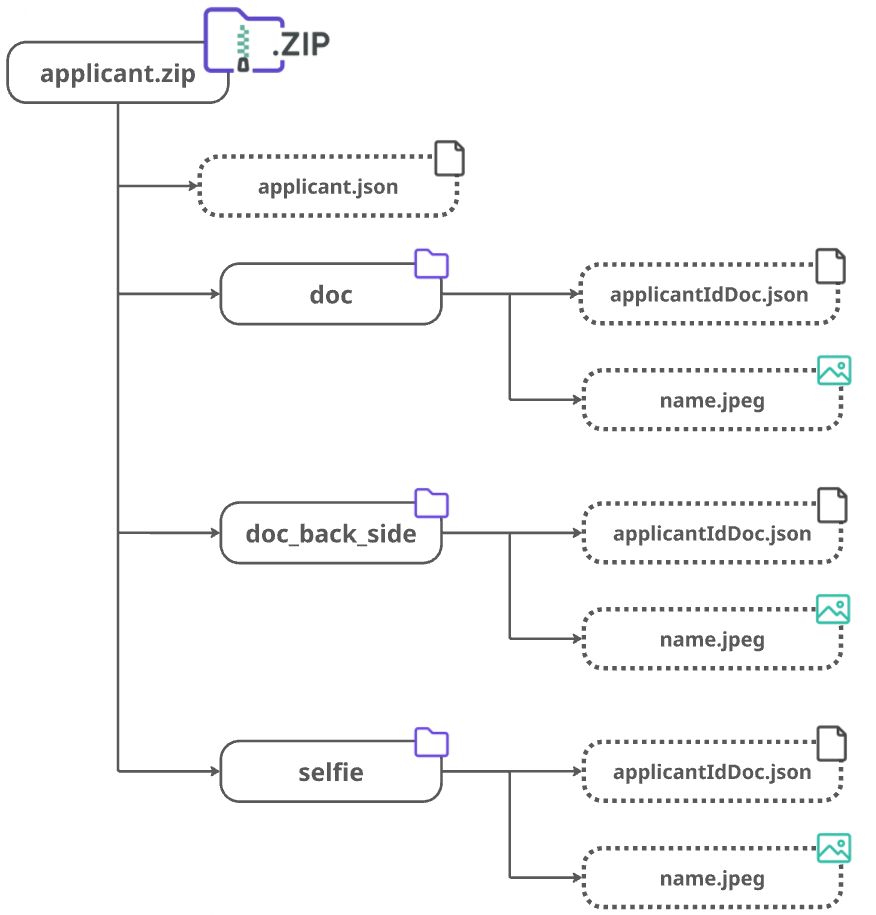
Contents of the ZIP-archive
applicant.jsonfile containing the result of the applicant verification.- Folders containing data for individual verification steps:
- images (in
.jpeg/.jpg/.pngformat) or video (.mp4) for face liveness detection, applicantIdDoc.jsonfile containing information about the verification step.
- images (in
The number and type of folders depend on the required steps configured for the verification level.
Warning:
The applicantIdDoc.json file must always include the idDocType and country parameters.
Example structure of the archive for creating an applicant with identity verification steps (two pages) and a selfie.
Contents of applicant.json
| Name | Type | Required | Description |
|---|---|---|---|
externalUserId | String | Yes | External applicant identifier — the unique identifier of the user in your system. |
info | Object | Yes | Applicant data extracted from the user's documents. |
review | Object | Yes | Detailed information about the verification result. |
Fields of the info object
| Name | Type | Required | Description |
|---|---|---|---|
firstName | String | Yes | First name. |
lastName | String | Yes | Last name. |
middleName | String | No | Middle name or patronymic. |
legalName | String | No | Name as per passport. |
gender | String | No | Gender (M or F). |
dob | String | No | Date of birth (YYYY-mm-dd). |
placeOfBirth | String | No | Place of birth. |
countryOfBirth | String | No | Country of birth. |
stateOfBirth | String | No | State/region of birth. |
country | String | Yes | Three-letter country code Alpha-3 (for example, RUS). |
nationality | String | No | Three-letter country code Alpha-3 (for example, RUS). |
addresses | Array | No | List of addresses. |
tin | String | No | Taxpayer Identification Number (TIN). |
Fields of the addresses object
| Name | Type | Required | Description |
|---|---|---|---|
country | String | No | Three-letter country code Alpha-3 (for example, RUS). |
postCode | String | No | Postal code. |
town | String | No | City or locality name. |
street | String | No | Street name or full address depending on the document format. |
subStreet | String | No | Additional street information. |
state | String | No | Region/state/province name. |
buildingName | String | No | Building name or number. |
flatNumber | String | No | Apartment number. |
buildingNumber | String | No | Building number. |
Fields of the review object
| Name | Type | Required | Description |
|---|---|---|---|
createDate | Date | Yes | Date the applicant was created (yyyy-MM-dd HH:mm:ss+0000). |
reviewDate | Date | No | Date the verification was completed (yyyy-MM-dd HH:mm:ss+0000). |
levelName | String | Yes | The name of the verification level, as configured in the «Application Levels» section of the Dashboard. |
reviewResult | Object | Yes | Additional information about the verification result. |
reviewStatus | String | Yes | Current verification status of the applicant. |
Fields of the reviewResult object
| Name | Type | Description |
|---|---|---|
moderationComment | String | Optional. Human-readable comment that may be shown to the end user. |
clientComment | String | Optional. Human-readable comment that should not be shown to the end user. |
reviewAnswer | String | Verification result. Must be GREEN. |
Warning:
The value of reviewAnswer must be GREEN, as this endpoint is used for importing only approved applicants.
Example content of the applicant.json file
{
	"externalUserId": "someClientUserId",
	"info": {
		"firstName": "John",
		"lastName": "Snow",
		"country": "GBR"
	},
	"review": {
		"createDate": "2022-11-21 08:25:32+0000",
		"reviewDate": "2022-11-21 08:25:36+0000",
		"levelName": "basic-kyc-level",
		"reviewResult": {
			"moderationComment": "",
			"clientComment": "",
			"reviewAnswer": "GREEN"
		},
		"reviewStatus": "completed"
	}
}
Contents of the applicantIdDoc.json file
| Name | Type | Required | Description |
|---|---|---|---|
idDocType | String | Yes | Type of document. |
idDocSubType | String | No | FRONT_SIDE, BACK_SIDE, or null. |
country | String | Yes | Three-letter country code Alpha-3 (for example, RUS). |
firstName | String | No | First name. |
middleName | String | No | Middle name or patronymic. |
lastName | String | No | Last name. |
issuedDate | String | No | Issue date (format YYYY-mm-dd). |
validUntil | String | No | Expiration date (format YYYY-mm-dd). |
number | String | No | Document number. |
dob | String | No | Date of birth. |
placeOfBirth | String | No | Place of birth. |
Example content of the applicantIdDoc.json file
{
	"idDocType": "ID_CARD",
	"country": "GBR",
	"firstName": "John",
	"lastName": "Doe",
	"issuedDate": "2020-09-25",
	"number": "1234567890",
	"dob": "1985-01-23"
}
Response
The response is a JSON object containing information about the applicant.
Example
curl  -X  POST  \
	'https://api.idngo.kz/resources/applicants/-/applicantImport' \
	-H  'Content-Type: application/zip'  \
	-d 'An archive file.'
# PATCH Deactivate applicant
This endpoint is used to deactivate (remove) an applicant.
The applicant remains in the database, but its data will be ignored during duplicate checks when registering new applicants.
You can always reactivate an applicant later by setting {status} to activated.
The system does not allow deactivating profiles that are currently under review (statuses pending, queued, or prechecked).
PATCH /resources/applicants/{applicantId}/presence/{status}
Request parameters
| Name | Type | Required | Description |
|---|---|---|---|
applicantId | String | Yes | Unique identifier of the applicant in our system. |
status | String | Yes | Assigned status: deactivated (default) — remove the profile, activated — restore the profile to active status. |
Response
The response is a JSON object containing an array of applicant data objects. The returned data depends on your system access rights.
Warning:
The deleted parameter indicates the result of the request:
true— the applicant has been deactivated.false— the applicant is active.
Example
curl  -X  PATCH  \
	'https://api.idngo.kz/resources/applicants/63e096c51b6b400000000000/presence/deactivated'
{
	"id"  :  "652dsf45fg563798cee64d3e",
	"createdAt"  :  "2023-10-16 13:34:54",
	"key"  :  "WBFHTKYHGUTOLX",
	"clientId"  :  "john.doe",
	"inspectionId"  :  "652deh58gk68df29cee64d3f",
	"externalUserId"  :  "dash-315bcbed-eadd-4f50-a5f4-csge467fht269",
	"applicantPlatform"  :  "API",
	"requiredIdDocs"  :  {
		"videoIdent"  :  true,
		"videoIdentUploadTypes"  :  [  "UTILITY_BILL"  ],
		"docSets"  :  [
			{
				"idDocSetType"  :  "IDENTITY",
				"types"  :  [  "ID_CARD",  "PASSPORT"  ]
			},
			{
				"idDocSetType"  :  "PROOF_OF_RESIDENCE",
				"types"  :  [  "UTILITY_BILL"  ],
				"poaStepSettingsId"  :  "64ad4c234568fghj28f496ad"
			}
		]
	},
	"deleted"  :  true,
	"review"  :  {
		"levelName"  :  "vi_old",
		"createDate"  :  "2023-10-16 13:39:34+0000",
		"startDate"  :  "2023-10-16 13:39:47+0000",
		"reviewStatus"  :  "init",
		"priority"  :  0,
	},
	"lang"  :  "en",
	"type"  :  "individual"
}